
Microsoft Intune Benefits and Real-World Use Cases
Microsoft Intune delivers key benefits such as secure device management, simplified app deployment, and strong compliance controls, with real‑world use cases like enabling remote work, protecting employee smartphones, and ensuring data security across diverse platforms.
Real world use cases
- BYOD (Bring Your Own Device): Protect corporate data in personal devices using App Protection Policies (MAM). No need to enroll the device; only corporate apps are managed.
- Corporate-owned devices (MDM): Fully manage device settings, encryption, Wi-Fi/VPN, certificates, and apps. Use Autopilot for Windows zero-touch provisioning.
- Remote work enablement: Users receive policies and apps over the internet. Compliance ensures only healthy devices can access resources.
- App-centric security: Focus on protecting data inside apps (Outlook, Teams, OneDrive) via DLP rules.
- Regulatory compliance: Enforce encryption, passcodes, and OS versions; generate reports for audits.
- Migrations: Move from legacy GPO/SCCM to Intune policies and modern management.
BYOD example (iOS/Android)
- Step 1: Publish Outlook and Teams with App Protection Policies.
- Step 2: User installs apps from the store, signs in with corporate account.
- Step 3: Policies apply: PIN required; restrict copy/paste to managed apps; block saving to personal storage.
- Outcome: Corporate email/data is protected; personal photos and apps remain untouched.
Corporate Windows example (Autopilot + Intune)
- Step 1: Device is ordered and registered with Autopilot.
- Step 2: User powers on, connects to Wi-Fi, and signs in.
- Step 3: Device auto-enrolls in Intune; configuration and apps deploy.
- Step 4: Compliance policy ensures encryption (BitLocker) and Defender status.
- Outcome: Fully managed, compliant device ready in minutes, no manual imaging.
Conditional Access and Compliance together
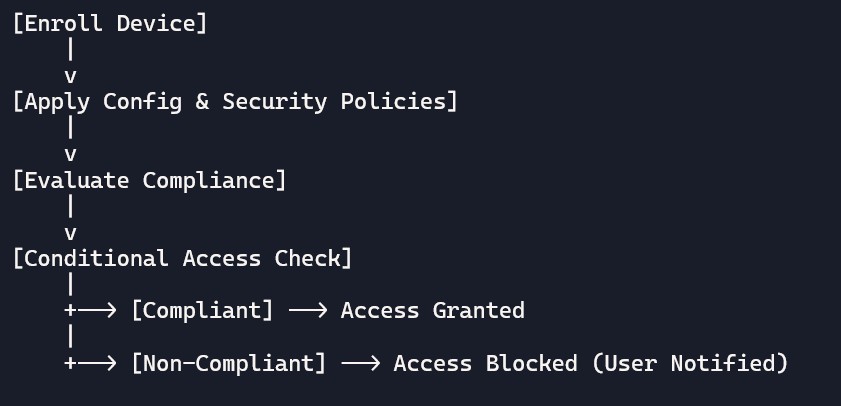
- Flow: Device enrolled → Compliance evaluated → Conditional Access checks compliance → Grants or denies access to apps like Exchange, SharePoint, Teams.
- Benefit: Only secure devices get access; risky or non-compliant devices are blocked until fixed.
Sample diagram: policy and access flow
Why Microsoft Intune Matters: Benefits, ROI, and Getting Started
Intune in Simple Words
Microsoft Intune is a cloud service that helps companies manage devices and apps securely. According to Forrester, businesses using Intune can see up to 300% return on investment (ROI) in just 3 years because IT support costs go down and security breaches are reduced.
Key Benefits
- No servers needed: Everything runs in the cloud, so you don’t need to buy or maintain hardware.
- Works on all platforms: Windows, macOS, iOS, and Android.
- Smart insights: AI-driven reporting and monitoring help IT teams make better decisions.
Quantified Benefits
- Security: Respond to threats 50% faster with Intune’s zero-trust approach.
- Productivity: The Company Portal app lets employees install apps themselves, cutting helpdesk tickets by 40%.
- Cost savings: No servers means saving around $50,000 per year for 1,000 users. You only pay for what you use.
- Scalability: Intune can manage 100,000+ devices worldwide with global data residency.
Real-World Example
A small business with 50 employees moved from old Group Policy to Intune:
- Day 1: Devices enrolled automatically using Autopilot.
- Week 1: Apps deployed, and 98% of devices were compliant.
- Result: IT staff spent less time on manual tasks and more time on strategic work.
Getting Started in 4 Easy Steps
- Sign up for a trial: Go to admin.microsoft.com → Intune → Start trial.
- Set up your tenant: Create your Intune environment and assign licenses.
- Enroll a test device: Try it out with one laptop or phone.
- Apply a baseline policy: Start with basic security settings like password and encryption.
Common beginner pitfalls and fixes
- Pitfall: Assigning policies to “All devices” too early.
- Fix: Use pilot groups first, then scale.
- Pitfall: Conflicting policies (duplicate settings from multiple profiles).
- Fix: Consolidate and document policy intent; prefer Settings Catalog with clarity.
- Pitfall: No clear naming convention.
- Fix: Adopt “CITS /IND/WIN” prefixes and include platform/region.
- Pitfall: Missing licenses.
- Fix: Use reports to validate user license assignments regularly.
- Pitfall: Ignoring app protection for BYOD.
- Fix: Enable MAM to protect data even without device enrollment.
Bonus: naming conventions and structure
- Profiles: “CITS-WiFi-HQ-Prod”, “CITS -VPN-India-Prod”, “CITS -Restrictions-iOS-Std”
- Compliance: “CITS -Win11-Std”, “CITS -Android-Strict”, “CITS -macOS-Std”
- Apps: “APP-Outlook-Req-AllUsers”, “APP-Teams-Avail-Sales”
- Groups: “GRP-Users-India”, “GRP-Devices-Win11-Corp”
- Tags: “TAG-India”, “TAG-EU”, “TAG-HQ”
FAQ Section:
- What is device enrollment?
It’s the process of registering a device with Intune so it can be managed. - Which platforms can be enrolled?
Windows, macOS, iOS/iPadOS, and Android devices. - Do users need to do anything?
Yes, they sign in with their work account to enroll their device. - What is Autopilot?
A Windows feature that sets up and enrolls devices automatically from day one. - Can I block certain devices from enrolling?
Yes, with enrollment restrictions (e.g., block jailbroken or personal devices). - Is enrollment required for BYOD?
Not always — BYOD can use App Protection Policies without full enrollment. - How long does enrollment take?
Usually just a few minutes once the user signs in.